> For the complete documentation index, see [llms.txt](https://fistkim101.gitbook.io/tech-blog/llms.txt). Markdown versions of documentation pages are available by appending `.md` to page URLs; this page is available as [Markdown](https://fistkim101.gitbook.io/tech-blog/undefined/reactive-programming-in-modern-java-using-project-reactor/transform.md).
# Transform
변환에 관한 연산자 정리
## Flux.flatMap
up-stream 이 emit 하는 각각의 element 들을 들어오는 순서대로 모두 Publisher로 만들고, 이렇게 만들어진 multiple 한 Publisher 들을 모두 eagerly 하게 subscribe 해서 하나의 Flux로 merge 한 down-stream 을 반환한다.
여기서 up-stream의 element 들을 inner publisher 로 만드는 과정에서 각각의 lifecycle을 가진 여러 publisher 가 layer 처럼 쌓이고 이를 flatten 해서 하나의 single flow 로 merge 하기 때문에 "flat" + "map" 이라고 할 수 있다.
각각의 inner publisher 들은 독자적인 life cycle을 지니므로 flatMap 이 최종적으로 반환하는 down-stream인 하나의 flux는 최초 up-stream에 있던 순서를 보장하지 않는다.
parameter 로는 element 들을 inner publisher로 변환해줄 mapper function을 받는다.
```java
Flux numbers = Flux.fromIterable(List.of(1, 2, 3, 4, 5, 6, 7, 8, 9, 10));
numbers.flatMap(number -> {
int delay = new Random().nextInt(10);
return Mono.just(number + 1).delayElement(Duration.ofMillis(delay));
})
.log()
.subscribe();
```
```bash
21:34:12.949 [main] DEBUG reactor.util.Loggers$LoggerFactory - Using Slf4j logging framework
21:34:12.998 [main] INFO reactor.Flux.FlatMap.1 - onSubscribe(FluxFlatMap.FlatMapMain)
21:34:13.001 [main] INFO reactor.Flux.FlatMap.1 - request(unbounded)
21:34:13.036 [parallel-8] INFO reactor.Flux.FlatMap.1 - onNext(9)
21:34:13.037 [parallel-8] INFO reactor.Flux.FlatMap.1 - onNext(11)
21:34:13.039 [parallel-8] INFO reactor.Flux.FlatMap.1 - onNext(4)
21:34:13.041 [parallel-8] INFO reactor.Flux.FlatMap.1 - onNext(8)
21:34:13.043 [parallel-1] INFO reactor.Flux.FlatMap.1 - onNext(2)
21:34:13.044 [parallel-9] INFO reactor.Flux.FlatMap.1 - onNext(10)
21:34:13.044 [parallel-9] INFO reactor.Flux.FlatMap.1 - onNext(3)
21:34:13.044 [parallel-9] INFO reactor.Flux.FlatMap.1 - onNext(5)
21:34:13.046 [parallel-6] INFO reactor.Flux.FlatMap.1 - onNext(7)
21:34:13.046 [parallel-6] INFO reactor.Flux.FlatMap.1 - onNext(6)
21:34:13.047 [parallel-6] INFO reactor.Flux.FlatMap.1 - onComplete()
```
참고 : 위 sample 처럼 delay 를 걸어주면 위와 같이 여러 thread 가 subscribe에 참여하고, delay 를 빼주면 단일 thread 만 참여한다. delayElement 의 설명에도 나와있지만 delay 가 걸릴 경우 parallel scheduler 에 의해 실행되도록 reactor 가 만들어져 있다.
## Flux.concatMap
up-stream 의 element를 비동기적으로 각각 publisher 로 변환은 하지만 정작 subscribe는 up-stream 의 element 순서를 유지하면서 차례 차례 하여 이를 모두 down-stream 으로 merge 하여 반환한다.
parameter 는 flatMap과 마찬가지로 up-stream 의 element 들을 inner publisher 로 변환해줄 mapper function을 받는다.
```java
@Test
void concatMapTest() throws InterruptedException {
Flux numbers = Flux.fromIterable(List.of(1, 2, 3, 4, 5, 6, 7, 8, 9, 10));
long delay = 1000L;
numbers.concatMap(number -> Mono.just(number).delayElement(Duration.ofMillis(delay)))
.log()
.subscribe();
Thread.sleep(15000L);
}
```
```bash
21:54:06.412 [main] DEBUG reactor.util.Loggers$LoggerFactory - Using Slf4j logging framework
21:54:06.461 [main] INFO reactor.Flux.FlatMap.1 - onSubscribe(FluxFlatMap.FlatMapMain)
21:54:06.463 [main] INFO reactor.Flux.FlatMap.1 - request(unbounded)
21:54:07.530 [parallel-1] INFO reactor.Flux.FlatMap.1 - onNext(1)
21:54:07.531 [parallel-1] INFO reactor.Flux.FlatMap.1 - onNext(2)
21:54:07.531 [parallel-1] INFO reactor.Flux.FlatMap.1 - onNext(3)
21:54:07.531 [parallel-1] INFO reactor.Flux.FlatMap.1 - onNext(4)
21:54:07.531 [parallel-1] INFO reactor.Flux.FlatMap.1 - onNext(5)
21:54:07.531 [parallel-1] INFO reactor.Flux.FlatMap.1 - onNext(6)
21:54:07.531 [parallel-1] INFO reactor.Flux.FlatMap.1 - onNext(7)
21:54:07.531 [parallel-1] INFO reactor.Flux.FlatMap.1 - onNext(8)
21:54:07.531 [parallel-1] INFO reactor.Flux.FlatMap.1 - onNext(9)
21:54:07.531 [parallel-1] INFO reactor.Flux.FlatMap.1 - onNext(10)
21:54:07.533 [parallel-1] INFO reactor.Flux.FlatMap.1 - onComplete()
```
## Flux.flatMap vs Flux.concatMap
둘의 가장 큰 차이는 up-stream 의 element 들을 모두 변환한 각각의 inner publisher 들을 subscribe 하는 행위를 비동기적으로 처리하느냐, 아니면 up-stream 의 element 의 순서를 고려하여 하나 subscribe 하고 다오면 다음 것을 subscribe 하는 식으로 하여 down-stream 에 merge 하느냐의 차이이다.
다시 말해,
flatMap 은 inner publisher 들 모두를 비동기적으로 subscribe 하여 onNext로 들어오는 값들을 들어오는 순서대로 down-stream 에 merge 하는 것이다. 즉, 오는 대로 merge 하기에 up-stream의 순서를 보장하지 않는다.
concatMap의 경우 up-stream의 element 들을 inner publisher로 바꾸는 것 자체는 비동기적으로 이뤄지지만 결국 각각의 inner publisher를 subscribe 하는 것은 up-stream의 순서를 지키면서 subscribe -> 대기 -> onComplete 확인 후 다음 inner publisher 를 subscribe -> 대기.. 와 같은 순으로 처리해서 merge 된 down-stream 을 만든다.
이러한 차이로 인해 전체 처리시 시간 소요의 차이가 매우 크다. 아래는 이 두 연산자의 차이를 확인 할 수 있는 코드이다.
```java
@Test
void concatMapTest() throws InterruptedException {
Flux numbers = Flux.fromIterable(List.of(1, 2, 3, 4, 5, 6, 7, 8, 9, 10));
long delay = 1000L;
numbers.concatMap(number -> Mono.just(number).delayElement(Duration.ofMillis(delay)))
.log()
.subscribe();
Thread.sleep(15000L);
}
@Test
void flatMapTest() throws InterruptedException {
Flux numbers = Flux.fromIterable(List.of(1, 2, 3, 4, 5, 6, 7, 8, 9, 10));
long delay = 1000L;
numbers.flatMap(number -> Mono.just(number).delayElement(Duration.ofMillis(delay)))
.log()
.subscribe();
Thread.sleep(15000L);
}
```
cf. 참고 : concatenate(1.사슬같이 잇다; 연쇄시키다; <사건 등을> 결부시키다, 연관시키다. 2.연쇄된, 이어진, 연결된)
## Flux.flatMapSequential
flatMap 처럼 inner publisher 를 비동기적으로 subscribe 하지만 inner publisher 로 부터 emit 되는 값들을 모두 queue 에 담아뒀다가 최종적으로 down-stream 을 구성할 때에는 up-stream의 source order에 맞춰서 merge 하는 연산자이다.
## Mono.flatMapMany
up-stream 의 element를 publisher 로 변환하여 이를 subscribe하여 Flux인 down-stream 을 만들어서 반환한다.
parameter로 up-stream 의 element 를 publisher 로 변환해주는 mapper function을 받는다.
```java
@Test
void flatMapManyTest() {
Mono nameMono = Mono.just("leo");
Flux chars = nameMono.flatMapMany(name -> Flux.fromIterable(List.of(name.split("")))).log();
StepVerifier.create(chars)
.expectNext("l", "e", "o")
.verifyComplete();
}
```
## defaultIfEmpty
up-stream이 empty 일 경우 down-stream 에 제공할 기본 "값" 을 세팅해주는 연산자이다. 즉, 비어있는 up-stream 의 element를 기본값으로 대비해놓는 연산자이므로 up-stream 의 type 과 동일한 값이어야 한다.
```java
@Test
void defaultIfEmpty() {
Flux names = Flux.fromIterable(List.of("alex", "leo", "siri"));
Flux emptyFlux = Flux.empty();
Flux targetFlux = emptyFlux.defaultIfEmpty("leo").log();
StepVerifier.create(targetFlux)
.expectNext("leo")
.verifyComplete();
}
```
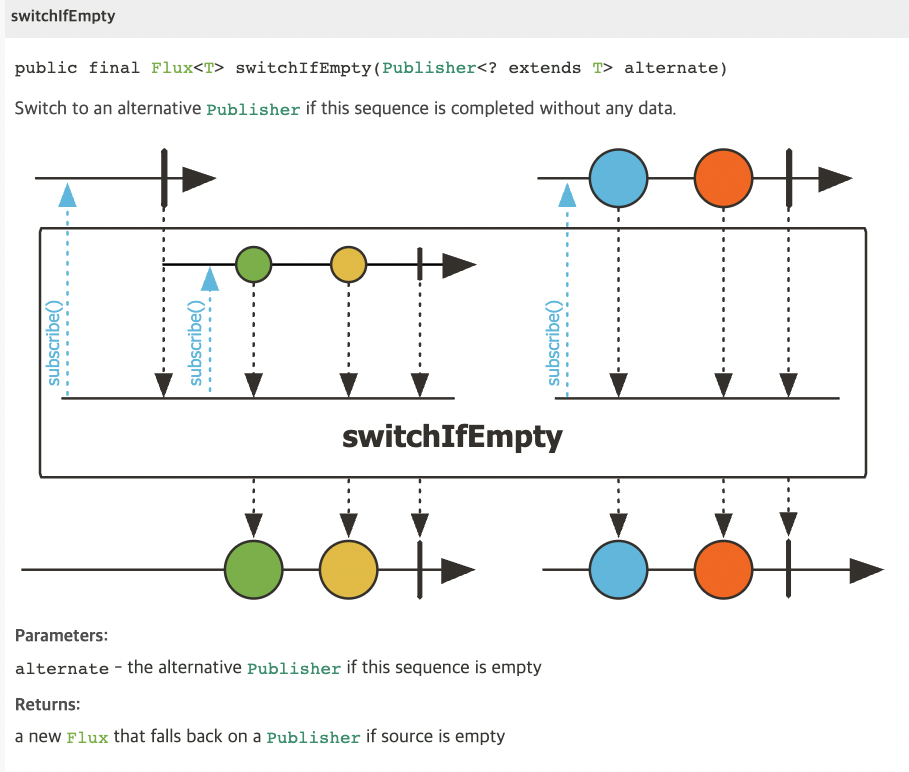
## switchIfEmtpry
up-stream 이 empty 일 경우 down-stream 으로 대체할 "publisher"를 정의해주는 연산자이다. 즉, up-stream 이 비어있다면 switchIfEmpty 에 정의한 "publisher"가 곧 down-stream이 되는 것이다.
```java
@Test
void switchIfEmpty() {
Flux names = Flux.fromIterable(List.of("alex", "leo", "siri"));
Flux emptyFlux = Flux.empty();
Flux targetFlux = emptyFlux.switchIfEmpty(names).log();
StepVerifier.create(targetFlux)
.expectNext("alex", "leo", "siri")
.verifyComplete();
}
```